July 2, 2026
My Obsidian Setup
I use this as a Second Brain and Digital Garden
Installed Plugins:
- Frontmatter Title - Show title by a frontmatter instead of a file name. Github: https://github.com/snezhig/obsidian-front-matter-title
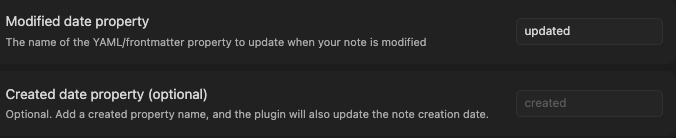
- Frontmatter Modified Date: Update date to editing note automatically. Github: https://github.com/alangrainger/obsidian-frontmatter-modified-date
- Style Settings - CSS plugin to deco Obsidian, Use together with Supercharged Links. Github: https://github.com/mgmeyers/obsidian-style-settings
- Obsidian Plugin: Supercharged Links - Add style to blacklinks. Github: https://github.com/mdelobelle/obsidian_supercharged_links
- Git - Git version control integration. Github: https://github.com/Vinzent03/obsidian-git
My Settings:
Frontmatter Title
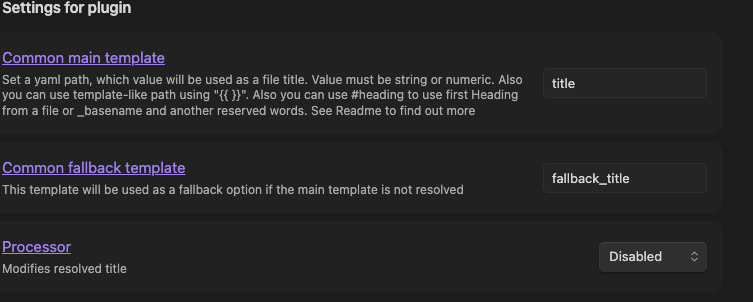
Enable All Features
Obsidian Plugin: Supercharged Links
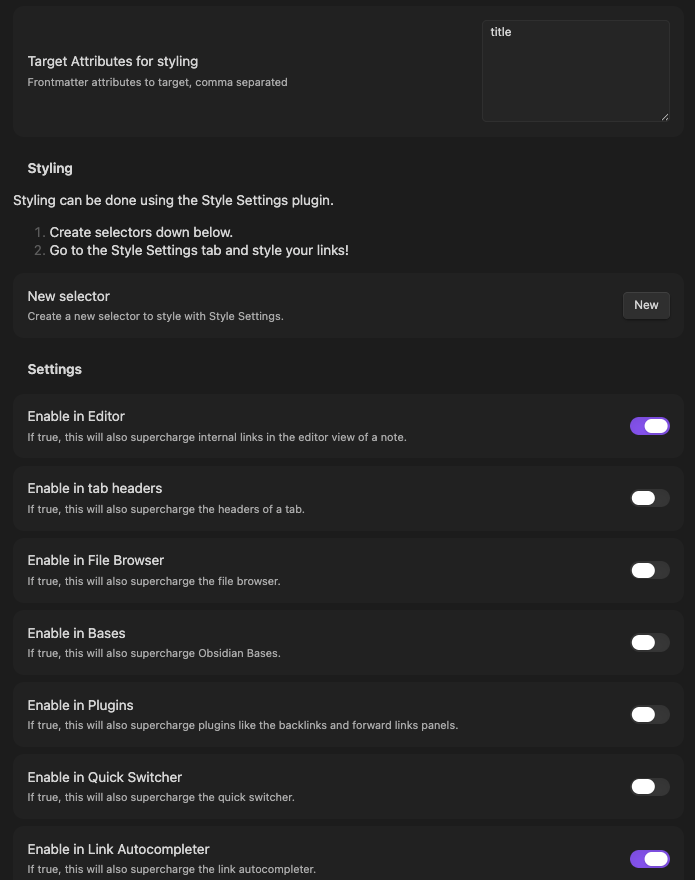
And paste file links.css in .obsidian/snippets
Adapted code from: https://forum.obsidian.md/t/internal-links-that-display-note-title-property-or-any-other/69467
/* In reading view, hide link content */
.markdown-reading-view .data-link-text[data-link-title] {
  font-size: 0px;
  visibility: hidden;
}

/* In reading view, show linked title */
.markdown-reading-view .data-link-text[data-link-title]::before {
  font-size: 16px;
  content: "> " attr(data-link-title);
  visibility: visible;
}

/* In reading view, if there is aria-label/ tool-tip show normal link text */
.markdown-reading-view .data-link-text[aria-label] {
  font-size: 16px;
}
/* In reading view, if there is aria-label/ tool-tip hide title  */
.markdown-reading-view .data-link-text[aria-labe]::before {
  content: none;
}
Frontmatter Modified Date